02-28-2011, 04:32 AM (This post was last modified: 02-28-2011, 07:19 AM by realchamp.)
Hello,
Having a problem with the orangebox version of srcds/css. I used to host a css server via srcds all the time before the orangebox update. After it switched to orangebox i am no longer able to have a functioning server.
I get this error "Unable to load steam support library. This server will operate in LAN mode only."
BASIC INFO Server OS: Windows 7 Ultimate x64 Processor: AMD 64 x2 2.01Ghz Ram: 4GB Game(s): Srcds/CSS Start Up Command: C:\srcds\orangebox\srcds.exe -autoupdate -console -game cstrike +maxplayers 24 +map de_dust2 Admin Mods: None (Until I get the server to function properly)
So basically I get that error message and I can only find my game in the "LAN" tab in the GUI of CSS. It never shows up in the "Internet" tab.
Here's the kicker - If I try to join the game, via the "LAN" tab...it times out. The server console shows absolutely nothing about me trying to connect.
All ports are forwarded and have been since before the orangebox days.
Yes I run Steam on the same PC. If I launch the server without Steam running, it will still throw me the same message. Are you suggesting I run the hldsupdatetool with the command "-verify_all" ?
So..
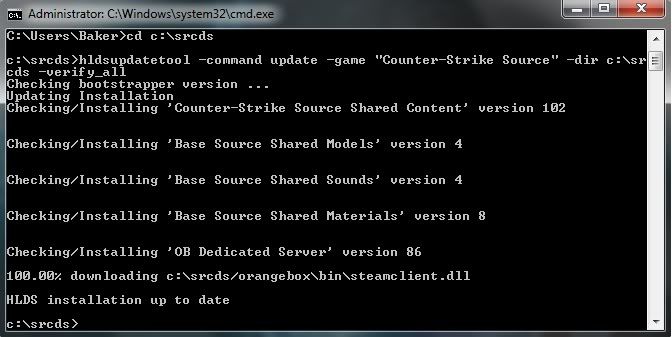
C:\srcds> hldsupdatetool -command update -game "Counter-Strike Source" -dir C:\srcds -verify_all ? Something to that extent?
02-28-2011, 06:54 AM (This post was last modified: 02-28-2011, 06:55 AM by realchamp.)
(02-28-2011, 06:53 AM)xfxBaker Wrote: Are you suggesting I run the hldsupdatetool with the command "-verify_all" ?
C:\srcds> hldsupdatetool -command update -game "Counter-Strike Source" -dir C:\srcds -verify_all ? Something to that extent?
That is correct.
(02-28-2011, 06:53 AM)xfxBaker Wrote: Yes I run Steam on the same PC. If I launch the server without Steam running, it will still throw me the same message.
So..
02-28-2011, 07:05 AM (This post was last modified: 02-28-2011, 07:06 AM by xfxBaker.)
Ok. Did the "-verify_all".
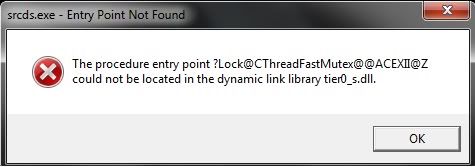
One thing I forgot to mention is that when I first tried to get this server going from scratch, I would get a funky error when launching that lead to the file in C:\srcds\orangebox\bin. The file is tier0_s.dll. I was doing some reading and found that by removing "steamclient.dll" out of the bin folder, the error would stop. So the "-verify_all" command replaced that file. I don't get the popup windows error ("funky error") for the file now after the files have been verified and the steamclient.dll file is now back where it should be. BUT..
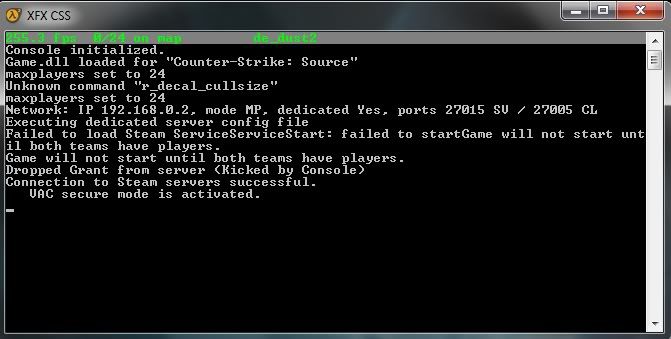
"Failed to load Steam ServiceServiceStart : failed to start" ?
02-28-2011, 07:11 AM (This post was last modified: 02-28-2011, 07:13 AM by xfxBaker.)
Alright, that's good to know. Kind of strange however.
I tried to start Steam and then the server after. Here's what happened. I got the "funky error" related to tier0_s.dll.
I clicked "OK", another popped up with the same error, clicked "OK" and the server continued to load. What's up with all these errors on the orangebox update? I'm going to try and connect to the server.
The error pops up when the server console says "Executing the dedicated server config file".
(02-28-2011, 07:11 AM)xfxBaker Wrote: Alright, that's good to know. Kind of strange however.
I tried to start Steam and then the server after. Here's what happened. I got the "funky error" related to tier0_s.dll.
I clicked "OK", another popped up with the same error, clicked "OK" and the server continued to load. What's up with all these errors on the orangebox update? I'm going to try and connect to the server.
The error pops up when the server console says "Executing the dedicated server config file".
That error can be ignored. It's nothing important, but indeed annoying.
Usually closing Steam would solve the problem and it also seems that it only happens on Windows 7
OMG it works!! It had to have been the "-verify_all" command! Thank you so much, realchamp!! I just connected fine through LAN and found it in the public list.
(02-28-2011, 07:17 AM)xfxBaker Wrote: OMG it works!! It had to have been the "-verify_all" command! Thank you so much, realchamp!! I just connected fine through LAN and found it in the public list.